Get hours back every week, and know exactly what to hand off first.
30 ready-made jobs for your AI agent, built for small service businesses. Each one tells you how much time it saves and exactly what to say.
Get the kit for $47 →Built by Joshua Ceaser, AI engineer in Austin.
One-time $47. Sign in by email after checkout.
See what you’ll get.
Follow up on every quote.
Give your agent the open quotes and ask it to draft a follow-up for each one. Review the drafts before sending.
Example draft: Hi Morgan, did you have any questions about the estimate we sent Tuesday? If you’re ready to move forward, I can confirm our next available dates.
The same tasks.
Every single week.
You’re answering the same emails, chasing the same invoices and following up on the same quotes every week.
“Use AI.”
But where do you start?
Everyone says use AI. Nobody tells you what to actually hand off first.
Your next step,
already laid out.
A members area that helps you choose, personalize and track the work you hand off.
Your first week, planned
Five steps, one a day. A checklist that keeps the starting point clear.
30 ready-made jobs
See the estimated time, what to connect and how often it runs.
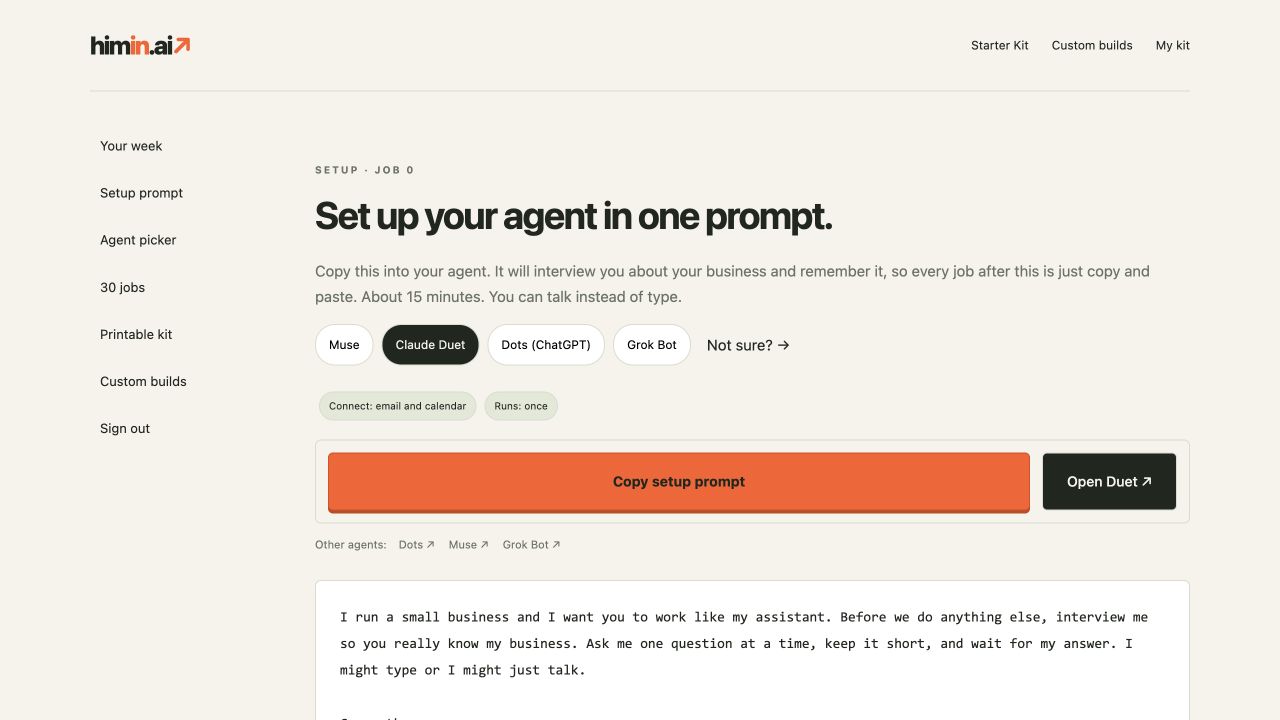
One setup prompt
Your agent interviews you once. After that, copy a job and paste. No blanks to fill in.
Pick the right agent
A short picker based on where you already work.
Track hours handed off
Turn jobs on in your tracker and see the rough weekly estimate.
Printable bonus
Keep the whole kit on hand as a printable companion.
Next up: your morning brief
One useful job. One clear step.
1 of 5 steps done
About 9 hours a week
Example with all five starter jobs turned on. Rough estimate, not measured savings. Marking a job on does not run it.
Start with five.
Build from there.
Your morning brief
about 30 minutes a day
Sort your inbox
about 3 to 5 hours a week
Answer new inquiries fast
about 2 to 3 hours a week
Follow up on every quote
about 1 to 2 hours a week
Friendly invoice reminders
about 30 minutes a week
For a busy owner doing this by hand, these five add up to an estimated 9 hours a week. Rough estimate. Actual savings depend on your workload and setup.
From one person
to a busy team.
Law offices, HVAC, cleaning crews, salons, clinics, accounting firms. Anywhere from 1 to 100 people.
You stay in charge. The prompts ask for draft-first work and approvals, but you must configure permissions and verify your agent follows them. Keep client and patient information out of this site.
I’m Joshua Ceaser, an AI engineer focused on agent workflows, business automation and the systems that make them reliable. My work brings together tools, memory, evaluations and human approvals so AI can do useful work.
Based in Austin, with a focus on small service businesses in Austin and the Rio Grande Valley.
Professional background ↗A few things to know.
Is this just a PDF?
No. It’s a members area that walks you through one setup prompt, then one job a day with a copy button, a first-week checklist and a time-saved tracker. The PDF is a bonus.
Which AI do I need?
The kit includes guidance for Muse, Grok Bot, Claude Duet and Dots. Features and availability vary. You can also use the prompts one at a time in ChatGPT, Claude or Copilot by supplying the notes or emails yourself and skipping recurring instructions.
How long does setup take?
Plan about 15 minutes for Job 0, then one job a day for your first week. Account access and app connections can take longer.
Will it send emails without me?
The prompts ask your agent to draft first and wait for your OK. Confirm approvals and permissions in your agent’s settings. The kit itself never sends email or runs an automation.
Do I need a ChatGPT account?
Yes. Use Sign in with ChatGPT to access your kit. Buying and claiming access through Stripe will be tested before sales open.
Refunds?
The refund policy will be published before checkout opens. No payments are being accepted yet.
Pick one job tonight.
Get an hour back this week.
Start small. Review the output. Add the next job when you’re ready.
Get the kit for $47 →